
Bot traffic analytics: see the real share of bots on your site
Nobody tells you today how much of your traffic comes from bots: your analytics only sees the ones that run its script, and your server logs don’t say who is who. Klacos serves your pages, so every request passes through it: it analyses each one and files it in its category, or keeps it aside while it’s still unclassified. At last you know who is using your site, and what that costs you.

What your analytics doesn’t show you
An analytics tool placed in your pages only counts whoever runs its script. The simplest bots never load it: they read your pages, load your server and fill in your forms without appearing in any report. The more sophisticated ones load it like a browser and pass themselves off as visitors.
Your server logs see everything, but they don’t tell you who is who. Between the two, nobody gives you the share of bots in your traffic. Yet it has a price: bandwidth and server time, forms to clean up, and figures you base decisions on. It can also shift from one week to the next: one new AI crawler, or a scraper that discovers your catalogue, is enough.
What you should expect: to see all of your traffic, not just the part that runs a script, sorted between people and bots, with the share of each. Our guide to bot traffic in your analytics explains how they get in.

What reaches your site, category by category
The Traffic view in the console puts every visit into one of these categories, with its share of your requests, day after day.
- Your human visitors Your audience
They flow into cookieless analytics, which shows what they do on your site.
- Verified search engines Counted apart
Checked with their operator before being believed. You see what they request, outside your audience.
- AI crawlers A line of their own
A category of their own, with requests and visitors, so you see their weight before you decide how to treat them.
- Impostors Unmasked
They borrow the name of a search engine or a well-known tool without coming from it, and aren’t counted among the good bots.
- Unknown bots Out of your figures
The ones that don’t say who they are: scrapers, scripts, fake visitors. They get their share of the traffic and drop out of your audience, even if they run your script.
- Attacks Stopped and explained
The web application firewall stops injection attempts and scanners before they reach your application, and records what triggered each block.
- Visits not yet classified Held apart, then sorted
A visitor isn’t always classified from their first request. They’re held apart, then sorted the next day with the final verdict.
Every classified visitor keeps the reason behind its classification: explained decisions, applied to your figures.
One screen for all of your traffic
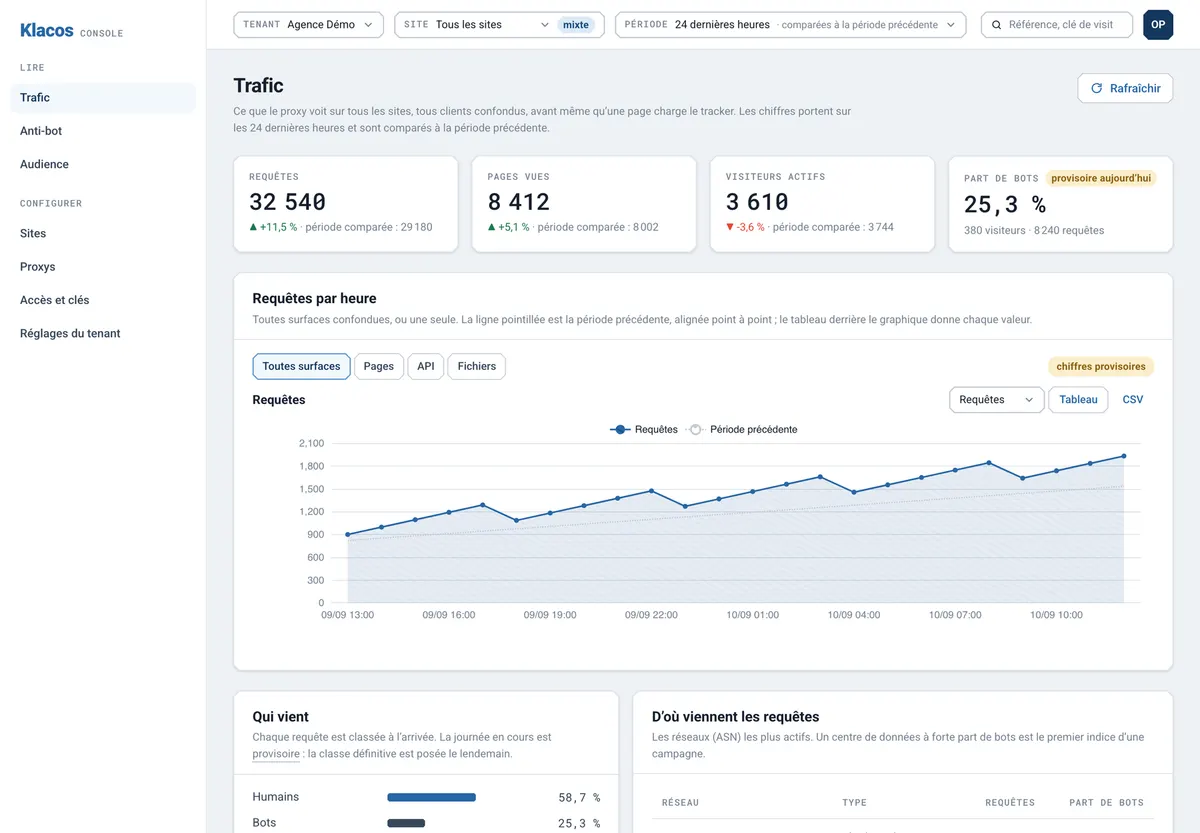
For the period you pick, the Traffic view shows requests, page views, active visitors and the share of bots, then how they move hour by hour. Below that: the split by category, the most active networks with their share of bots, and traffic by type of request.
The sorting comes from the same analysis as bot management: each visit is judged as a whole, in front of your site, not on what it claims to be. This screen is also where everything starts. The day Klacos goes in, it observes without blocking anything, so you see your traffic as it is before you decide a thing.
Your traffic, sorted and explained
People and bots
Good bots by category
Networks
Pages, APIs and files
What analytics missed
Provisional, then settled
Served from cache
Your past traffic
Figures that say what they know
On the day, provisional
A visitor isn’t always classified from their first request. Today’s figures say so: they’re marked provisional.
The next day, settled
Past days are recalculated with the final verdict on each visitor. A bot counted as a reader in the morning drops out of that day’s figures.
Unknown stays unknown
Whatever isn’t classified yet shows up as such. It isn’t filed under people or bots by default.
Traffic analysis is the first of the analytics capabilities in Klacos: it tells you who comes, before cookieless analytics tells you what the people do.
Questions about traffic analysis
Do I need to add a script to my pages?
No. Klacos sorts traffic in front of your site, across every request. The analytics script, if you use it, adds the detail of what your human visitors do.
Do you see bots that never run JavaScript?
Yes. Because the service serves your pages, it sees every request, whether or not it loads a script.
Are AI crawlers broken down one by one?
They form a category of their own, with requests and visitors. Those whose operator publishes a way to check them are verified before being believed; the rest are judged on their visit, like any other bot.
Why do today’s figures change the next day?
Because more is known about a visitor once they’ve moved through your site. Past days are recalculated with the final verdict, and the console marks today’s figures as provisional.
Can I see traffic from before?
Klacos counts from the day it’s in place. You can import your old web server logs into the Traffic view to keep a record of past traffic.
See how much of your traffic is automated
With early access, Klacos watches your traffic without blocking anything, from day one. Request access, or tell us about the bots you suspect are in your figures.