
AI crawler control: see what they take, then decide
AI crawlers read your site to train a model, feed an assistant’s answers or fetch a page for a user. Your server serves every one of them, and you have no idea how much they weigh. Klacos files them in a category of their own, verifies the ones that declare themselves, shows you their share of your traffic, then applies your choice: let them through, slow them down or block them.

Readers you pay for without knowing who they are
AI crawlers request pages like any visitor, and your server serves them at the same cost. Some work through your catalogue or archive at regular intervals and never send anyone back. Others cite you in an assistant’s answers and bring you readers. In your logs, they blur into search engines and into the scrapers that borrow their names.
Without numbers, both reflexes are expensive. Block them all and you drop out of answers that could have cited you. Let them all in and you hand over your content and your bandwidth, including to clients posing as a well-known bot.
This can’t wait any longer: every AI operator now runs several bots, one per use, and a robots.txt written once doesn’t tell you who actually comes in. Our guide to blocking AI crawlers use by use goes through each bot and what an opt-out changes with its operator. This page shows how to take back control of your own site.

Understand first, then govern
Blocking AI crawlers is nothing new. What Klacos changes is the order: you see what they do on your site before you choose, and your choice then applies to all of them, including the ones that ignore your robots.txt.
A category of their own
Observed by default
Four responses
Slow down, don’t shut out
Checked at the source
Impostors spotted
Silent bots judged on their visit
Asked from day one
Their share of your traffic, before you make the call
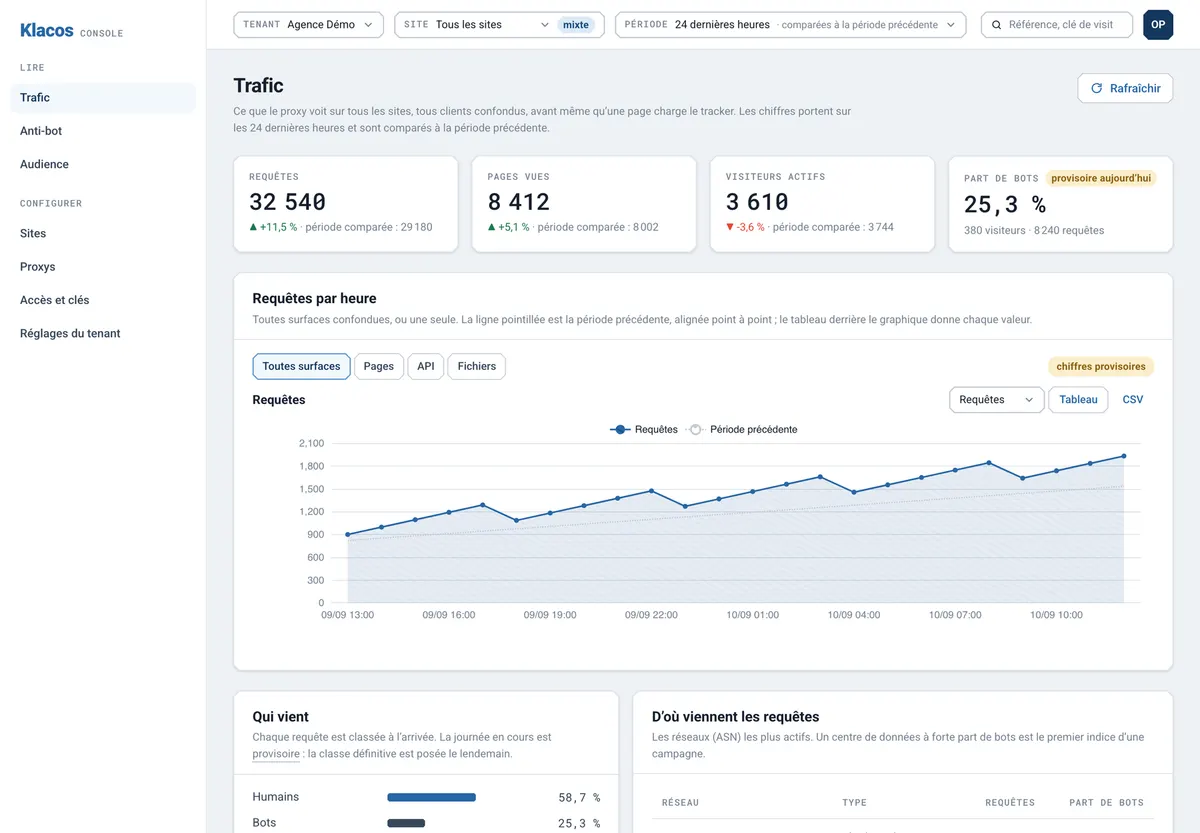
By default, AI crawlers are observed: they get through, and the Traffic view in the console shows what their category requested, in requests and in visitors, next to search engines and your human audience. On the analytics side, the visits assistants send you appear in your sources. You can weigh what the bots take against what they bring.
Before applying a setting, you replay it on your past traffic to see what it would have caught. While you observe, the console shows what your choice would have done without applying anything. You then move to slowing down or blocking one step at a time, with a one-click rollback.
A name is never enough to get in
Any script can put “GPTBot” in its requests. So OpenAI’s crawlers are verified against the addresses OpenAI publishes, like all verified bots, and a client borrowing their name from anywhere else is treated as an impostor. For other AI crawlers, the declared name can get them filed in the category, but it never opens a door.
That leaves the bot posing as a browser. No line in robots.txt reaches it. It is judged on its visit as a whole, like any visitor, by bot management. If it behaves like a bot, it is treated as one, whatever name it gives.

Your editorial line, applied to AI crawlers
You know how much of your traffic comes from AI crawlers, and your choice no longer depends on their goodwill. Your audience counts only people, and the readers assistants send you stay visible in your sources. Search engines keep their own setting: shutting AI crawlers out does not take you out of Google Search or any other search engine.
The setting covers the whole category, site by site. To target one bot in particular, robots.txt is still the place to name it; Klacos enforces the category’s setting on the bots that don’t read it.
For a news publisher, this is one part of a wider picture: content scraping protection for publishers covers the rest. AI crawler control is part of protecting your website.
Questions about AI crawler control
Will blocking AI crawlers remove me from search engines?
No. Search engines are a separate category, verified on their own, with their own setting.
Can I allow one AI crawler and block another?
The setting covers the whole category, site by site. To target a particular bot, name it in your robots.txt: the big operators give each use its own bot name, and their crawlers read that file.
Isn’t my robots.txt enough?
It is a request that well-behaved bots follow. Bots fetching a page for a user often skip it, and a script can borrow any name. Klacos applies the category’s setting to the bots that ignore the file, and judges the ones that don’t declare themselves on their visit.
How do I know an AI crawler is who it claims to be?
OpenAI’s crawlers are verified against the addresses OpenAI publishes: a client using their name from another address is treated as an impostor. For the rest, the declared name is not proof and opens no door.
What happens when I create my site?
The console asks what you want to do with AI crawlers. The suggested setting is to observe: they get through, and you see their share of your traffic before you choose.
See which AI crawlers read your site before you decide what to do with them
Request early access: your site starts in observation, and the share of AI crawlers shows before you change a single setting. Or talk to us about your content and the bots you see coming through.