
Automatic SSL certificates: every domain encrypted, no expiry date to watch
A certificate expires on a Friday evening, and your site turns into a warning nobody clicks past. With Klacos, every domain you add gets its certificate, renewed well before it expires, with no restart. Prefer your own certificates? They take priority.

An expired certificate is a site nobody sees
When a certificate expires, browsers show a warning instead of your site, and most visitors leave. With dozens of domains, sooner or later an expiry date slips through.
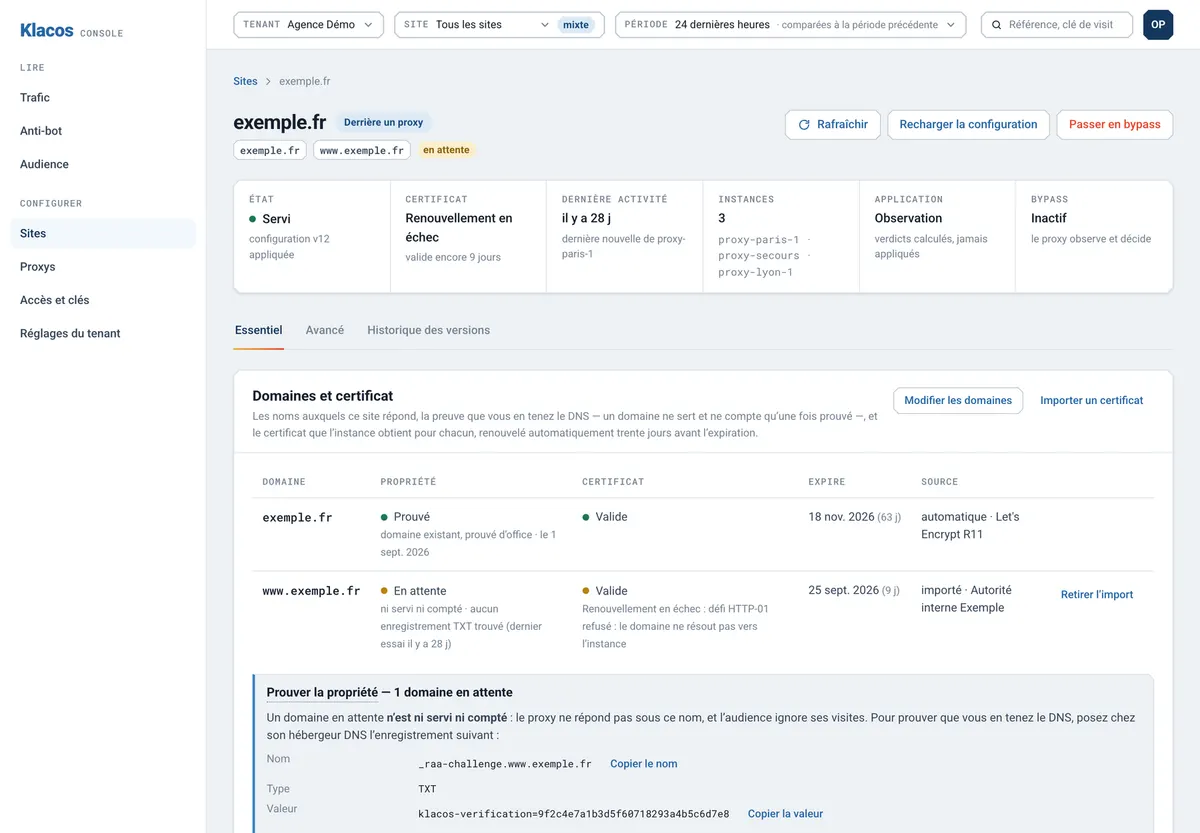
Klacos issues a certificate for every domain you add, renews it 30 days before expiry and applies it on the fly without dropping a connection. If a renewal fails, the console flags it straight away, then again 30 and 7 days before expiry, long before your visitors see an error. A certificate you’ve bought can be imported and takes priority, with the same alerts.
The keys for automatically issued certificates stay on the machine that serves your site: the console only receives their details, such as the domain and the expiry date.
Encryption for your domains, with nothing to keep an eye on
Issued for you
Renewed early
Your own certificates
All your domains
HTTPS everywhere
Timely alerts
Current TLS
Security headers
The right headers, without breaking your site
Security headers tell the browser to always use https, not to guess a file’s type, not to pass the full address of your pages on to other sites, and not to let your site be shown inside someone else’s frame. The usual set is added in one click, site by site.
It’s never forced on you, because a header that’s too strict can break an integration or a tool you rely on. You switch it on when you’re ready, and off again the same way. To close part of the site rather than encrypt it, see access rules. Certificates are part of your site’s protection, and the same service keeps your pages fast and online.

Questions about SSL certificates
What do I need to do to get a certificate?
Point your domain at Klacos, and prove once in the console that it’s yours, with a DNS record. The certificate follows with nothing else to do.
Can I keep the certificate I bought?
Yes. Once imported it takes priority, and the console warns you before it expires, as it does for the others.
Are subdomains covered?
Each one gets its own certificate. If you import a wildcard certificate, it covers one level of subdomains.
Is the link to my server encrypted too?
It can be: your server can be reached over https, with its certificate checked.
Encrypt every domain without giving it a thought
Request early access, or talk to us about the domains and certificates you manage today.