
Bots show up as visitors in Google Analytics because they load your pages in a real browser, such as headless Chrome driven by a script. The page runs, so does the analytics tag, and the visit is recorded as if a person had made it. Google Analytics only excludes bots it already knows from a list, and an automated browser that presents itself as ordinary Chrome isn’t on that list.
Adding another filter in the dashboard won’t fix it, because the tag only sees what the browser chooses to report. What separates that bot from a reader shows up outside the browser: the network the visit comes from, its pace, the way it moves from page to page. Those are the clues a cookieless analytics tool that keeps bots out of the numbers can sort visitors on, then correct the next day.
Why Google Analytics counts these bots
The Google Analytics tag runs in the browser. It sends a page view as soon as the page loads, whoever opened it: a person, or a program that launches Chrome without a screen through Puppeteer or Playwright, scrolls down and clicks a link. An automated browser does flag itself through the navigator.webdriver property, but one line of code clears that flag.
Google’s help page on known bot-traffic exclusion runs to a few lines. Traffic from known bots and spiders is excluded automatically, identified from Google’s own research and the International Spiders and Bots List maintained by the IAB (Interactive Advertising Bureau). You can’t switch the exclusion off, and you can’t see how much traffic it removed. A list recognises bots that declare themselves, and a bot sending the user agent of a recent Chrome declares nothing.
Plausible, which makes a competing analytics tool, ran the test in May 2025 and published it: visits sent with Puppeteer, from residential and data-centre addresses, were counted by Google Analytics, including those announcing themselves as “PostmanRuntime”. Its own tool kept none of them, because it does not stop at the user agent: it also filters referrer spam and some 40,800 data-centre IP ranges. The test comes from a Google competitor, but its method is written down and anyone can repeat it.
Some fake traffic never loads your pages at all: it’s events sent straight to the Google Analytics collection endpoint. That’s what the hostname filters Google added in June 2026, then extended with include filters on 21 September 2026, are for: they drop data that doesn’t come from your domains. An automated browser that opens your real page sends your real hostname, so those filters let it through.
Meanwhile, a large share of bots never run JavaScript. They never reach Google Analytics and only show up in your server logs. Leaving forged events aside, the bots inflating your reports are the ones running a full browser, which also makes them the hardest to tell apart from a reader.
What it looks like in your reports
In autumn 2025, a thread on the Google Analytics help forum gathered reports of sites flooded with “direct” traffic from China and Singapore. More than 400 people marked it as their question too. The accepted answer, posted by a Product Expert (a volunteer, not a Google employee), says the team concerned confirmed the problem: a new form of non-human traffic getting past the standard filtering.
That answer lists traits you can look for in your own reports:
- sessions with only the first events, session start and page view, and no interaction after that;
- spikes from unexpected countries or cities, often shown as “(not set)”;
- unusual concentrations of older devices or operating systems.
The thread’s opening post adds a simpler one: a Direct channel that grows with no campaign or link to explain it.
Every bot session goes into your averages. Engagement rate drops, so does average session duration, and the conversion rate thins out because sessions rise without a single extra sale. The share of direct traffic stops meaning anything, and a year-on-year comparison now sets two different populations against each other.
What to decide
Leave the history as it is
Google Analytics data filters only apply to new data: they don’t clean up the months already collected. An active filter, on the other hand, makes permanent changes. Excluding a whole country also removes the real readers there, with no way back for the filtered days.
To read your numbers without the bots, work on a segment instead: it changes the view, not the data, and it’s what the forum answer recommends. Note the date of the spike next to your reports. Whoever compares this period a year from now will need it.
Judge the whole visit, not what the script sees
Headless Chrome is real Chrome, down to the way it opens a connection, and its user agent says whatever its author chose. What gives it away sits outside the browser:
- the network the visit comes from: a hosting provider or data centre, where a reader goes through a broadband or mobile operator;
- navigation: pages reached without going through the pages that link to them, a pace too regular for a reader.
Neither is enough on its own. A reader can use a VPN hosted in a data centre, and a bot can rent residential IP addresses. A sound verdict combines several clues.
If your site sits behind a CDN, or you keep server logs, check where the connections came from on the day of the spike: a surge concentrated on a few hosting networks is a first clue. Doing that for every visitor, all the time, is the job of bot protection that looks at every visit as a whole.
See the bots, don’t just hide them
Filtering takes bots out of the numbers, but it doesn’t tell you what they are or what they cost you. Googlebot, your uptime monitor and the link preview in a chat app aren’t readers, yet you need them, and you’ll want to see them separately. A bot calling itself Googlebot isn’t always Googlebot: Google explains how to verify that a request really comes from its crawlers, with a reverse DNS lookup confirmed by a forward lookup, or against the IP ranges it publishes.
Your analytics won’t show you those bots. Google Analytics doesn’t report what it excludes, and bots that never run JavaScript never reach it. Seeing them means looking at traffic before it reaches the page: in your server logs, in your CDN’s reports, or in a bot-protection layer. Cloudflare, for one, shows that split in its Bot Analytics, but only on its Business and Enterprise plans; our guide to European Cloudflare alternatives covers what else to compare.
AI crawlers raise a separate question: what you’re willing to let them read. It’s decided crawler by crawler, and the guide on verifying and blocking AI crawlers covers it in detail. Don’t confuse them with visitors who arrive from an assistant such as ChatGPT or Perplexity: those are readers.
Ask your analytics tool how it classifies
Four questions for your analytics tool
- What does it judge a visitor on: what the browser declares, or the visit itself (network, path, pace)?
- Does it revisit a classification once it knows more, or does the first decision stand?
- Can you see the traffic it excluded, and why?
- Can it tell the real Googlebot from a bot borrowing its name?
See the real share of bots in your traffic
Klacos sits in front of your site. It serves your pages and, along the way, looks at each visit as a whole: where it comes from, how it connects, at what pace and by which path it moves through the site. Its cookieless analytics relies on that judgement rather than on what the browser announces.
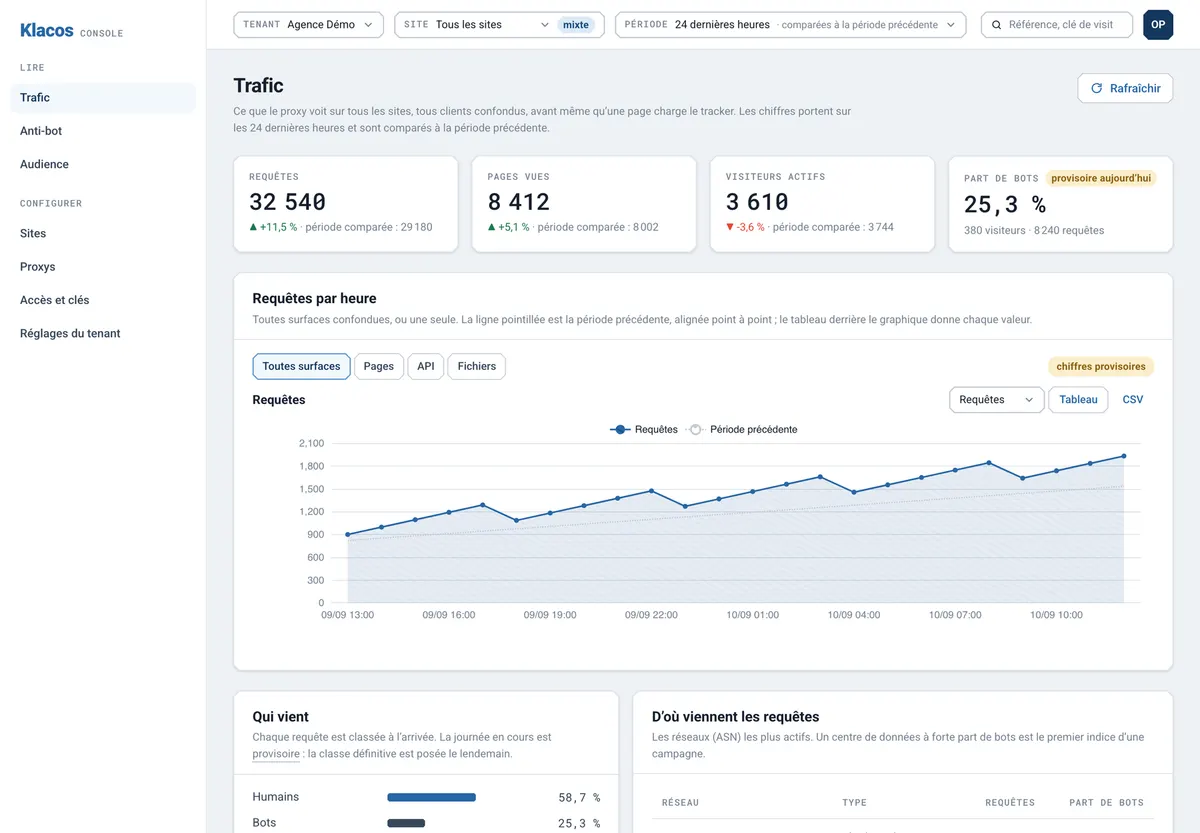
Because it serves the pages, Klacos also sees what the analytics script misses. Bots that never run JavaScript don’t appear in any audience report; here, the Traffic view shows them next to your readers. And the console compares pages served with pages measured, so you know what share of your traffic the script never sees.
Today’s figures are provisional, and the console marks them that way: they’re corrected the next day, once Klacos knows more about each visitor. A headless Chrome counted as a reader in the morning can drop out of that day’s numbers by the following day.
Legitimate bots, such as search engines and uptime monitors, are verified before they’re believed, never on their user agent alone. They’re left out of your audience and stay visible in the Traffic view, which shows for the same period the share of humans, bots, verified bots and visitors not yet classified, along with the most active networks and their share of bots. A fake Googlebot doesn’t pass for the real one.
The same sorting applies to your other tools. If your tags go through Klacos’s server-side tag manager, a tag set to skip bots doesn’t fire for a visit recognised as automated: Google Analytics and your ad platforms never receive it.
Two limits to know about. With the analytics script alone and no Klacos in front of the site, classification only sees what the browser declares, like any other tag. And Klacos counts from the day it’s in place: it doesn’t correct your Google Analytics history.